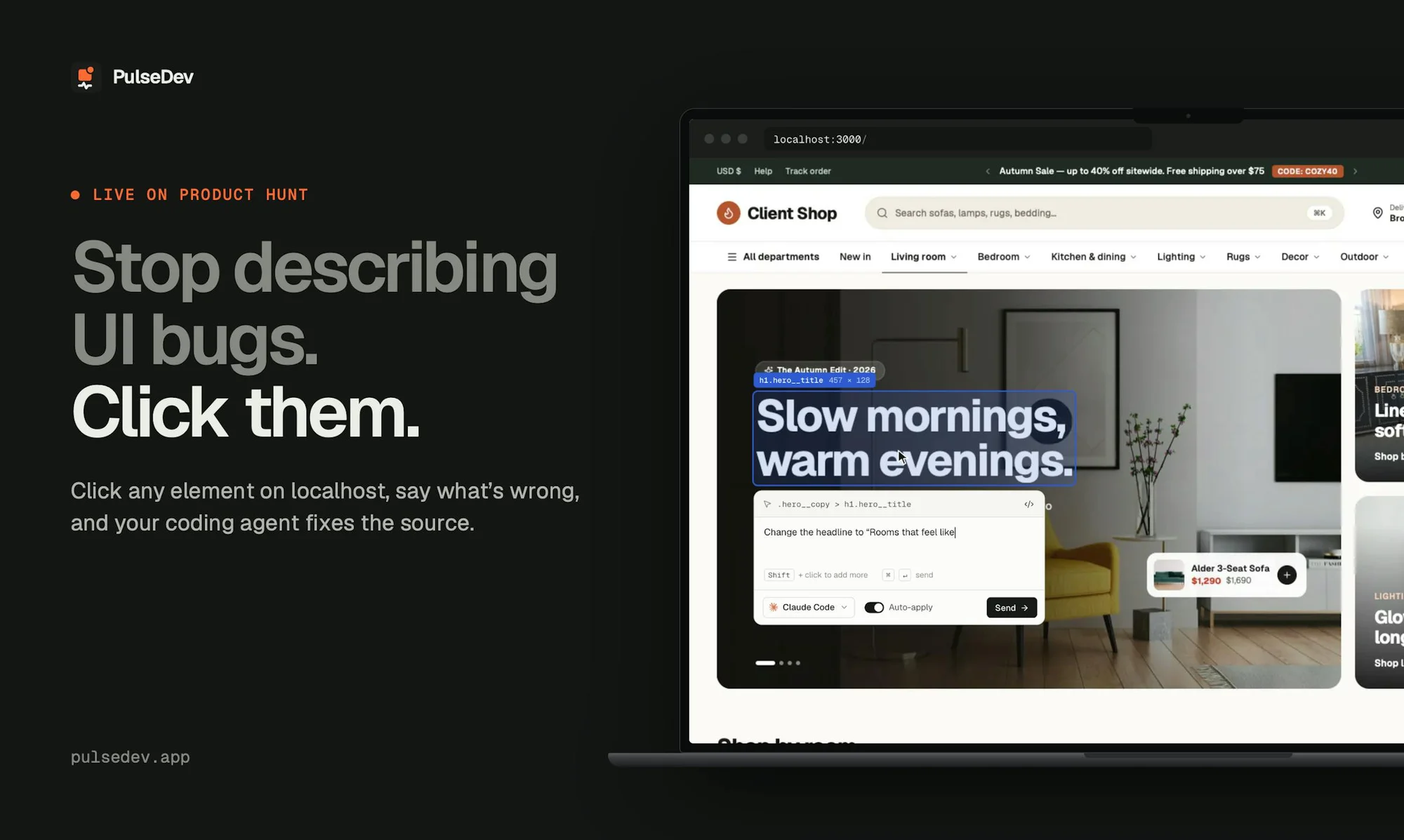
Perlat Kociaj kiadta a PulseDev nevű eszközt, amely leegyszerűsíti a weboldalak felületi hibáinak javítását AI-alapú kódoló ügynökökkel. A fejlesztőknek nem kell többé képernyőképekkel és kódmintákkal magyarázniuk a hibákat: elég a helyi tesztkörnyezetben futó oldalon a megfelelő elemre kattintaniuk, és élőszóval vagy szöveggel leírniuk a kívánt módosítást.
A PulseDev automatikusan csatolja a kiválasztott elem kontextusát, beleértve annak szelektorát és stílusait, valamint a támogatott esetekben forráskód-feltérképezést is biztosít. A rendszer együttműködik a Claude Code, Codex, Gemini CLI és OpenCode eszközökkel. A felhasználó élőben követheti a kódolási folyamatot, a javasolt módosítási eltérést (diff) pedig közvetlenül a böngészőben hagyhatja jóvá vagy utasíthatja el.
A munkafolyamatot megkönnyítő eszköz egy projektre ingyenesen használható macOS rendszeren. A korlátlan projekt-hozzáférést biztosító Pro csomag előfizetési díja 12 dollár havonta a megadott akció keretében. A használathoz a fejlesztők saját meglévő előfizetései és API-keretei érvényesek. A hivatalos weboldal a pulsedev.app címen érhető el.
Az eredeti szöveg (Product Hunt)
“The button below the second pricing card. No, the other one.”
When you’re building a website with a coding agent, you can see what needs changing: a button that doesn’t line up, a heading that wraps awkwardly, or spacing that feels off. But getting that change made means turning what you see into a text prompt.
You explain where the element is. Open DevTools. Copy a selector or take a screenshot. Find the component. Switch to the terminal, paste everything in, and hope you’ve given the agent enough context. Then go back to the browser to check the result.
For a small visual change, explaining the task can feel like more work than the change itself. And when there are several things to fix, you repeat that process for each one.
I was already looking at the bug. I just wanted to click it.
That’s why I built PulseDev: to give your coding agent the context behind the element you’re pointing at, alongside your instructions.
From “which button?” to “make this button taller”Click the element on your local site and describe what you want changed. PulseDev attaches the selected element’s context, including its selector and styles. The Vite plugin adds source mapping where supported, helping the agent locate the relevant code.
You still decide what the change should be. PulseDev handles the handoff from the page to your agent.
Open your local site in your browser and click an element. Shift-click to select more than one.
Describe the change: “Match this button’s height to the one beside it.”
Send it to Claude Code, Codex, Gemini CLI or OpenCode and follow the agent’s activity beside the page.
Review the proposed diff in your browser. Approve or reject it in review mode, or enable auto-apply when you want it.
Built for the tools you already usePulseDev works with your own browser, local project and installed coding agent. Add the widget with a script tag, or use the Vite plugin for source mapping where supported. Your agent’s usual usage limits and provider charges still apply.
It’s for the UI work that adds up: adjusting spacing, matching styles between elements, changing copy, and polishing the details before you ship.
Free for one project on macOS. Pro unlocks unlimited projects. Subscribe before November 3, 2026 for $12/month and keep that rate. New subscriptions are $18/month from November 3. No promo code needed.
I’d love to hear about your workflow- Think about the last UI change you asked a coding agent to make. What was harder: explaining which element you meant, or getting the change right?- How do you share UI context today—screenshots, selectors, file paths, or descriptions?- What would you need to see before trusting the proposed change?- After trying PulseDev, where did you still have to explain yourself?
Weboldal: https://pulsedev.app