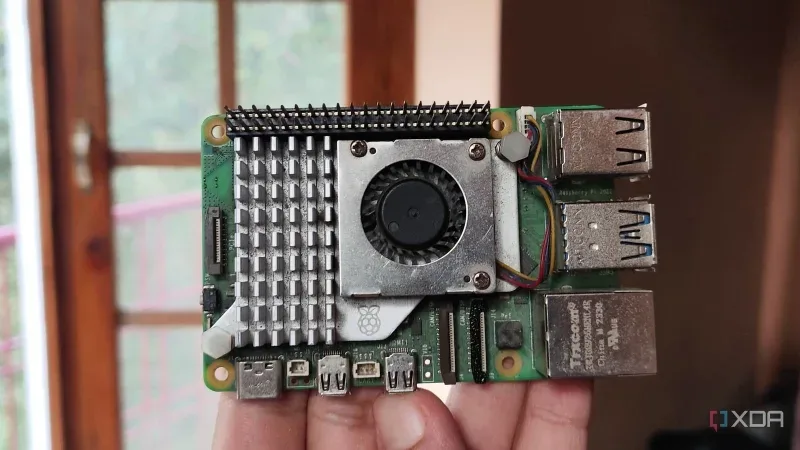
A Cactus Compute Needle 3 nevű AI-modellje a megszokott csevegőfunkciók helyett célzott gépi feladatokra összpontosít. A mindössze 29 MB memóriát igénylő modell képes eszközök és API-k hívására, strukturálatlan adatok JSON-né alakítására és vektorterek generálására, így nem igényli a megszokott több milliárd paraméteres architektúrát.
A modell különlegessége a szeletelhető architektúra, amellyel a hálózat mérete 2 és 20 réteg között állítható az adott hardver teljesítményéhez mérten. Ennek köszönhetően kiegészítő AI-gyorsító kártya nélkül is futtatható kisebb rendszereken, mint a Raspberry Pi 5, ahol a tesztek során több mint 280 token/másodperces feldolgozási sebességet ért el.
A Needle 3 beállítása Python-környezetet és a cactus-needle csomagot igényli. A gyakorlatban jól használható helyi rendszerek, például a Home Assistant okosotthon-vezérlő automatizálására, de alkalmas dokumentumok elemzésére és Docker-környezetek kezelésére is.
Az eredeti szöveg (XDA Developers (daily.dev))
I’ve documented all sorts of wacky AI experiments involving weak hardware here on XDA, with my Raspberry Pi 5 being a common guinea pig for a handful of these projects. To its credit, my tiny tinkering companion manages to deliver decent results with smaller LLMs, with Gemma 4 E2B being my preferred model for simple productivity tasks involving this SBC.
However, LLMs with chat interfaces aren’t the only AI models I can run on my weak hardware. Take the Cactus Compute Needle 3, for example. While it needs some tinkering with Python scripts, this slim model barely needs a few MBs to turn my “mere” SBC into an automation beast.
If you’re wondering how the Needle 3 manages to consume a maximum of 29MB, it’s because this AI model is a lot different from conventional LLMs. Typical large language models require billions of parameters to respond to queries in a chat-like interface. When you combine that with an underpowered system like the Raspberry Pi, it’s no wonder that even something as light as 3-4B models run under 10 tokens/second.
Meanwhile, the Cactus Compute Needle 3 ditches the general chat capabilities altogether. Instead, it focuses on machine level tasks such as calling tools for different services, converting unstructured data into its JSON equivalents, and generating vector spaces from text inputs – and these three jobs let it perform typical AI tasks without the extra computational overhead of typical chatbots. Combine that with the Needle 3’s unique sliceable ladder architecture that lets you choose the subnetworks from 2 to 20 layers depending on the underlying system, and you can see why I love tinkering with this edge LLM on my Raspberry Pi.
For reference, the SBC I’m testing it on is the Raspberry Pi 5, specifically the 8GB variant. OS-wise, I wanted to use Raspberry Pi OS Lite, but since DietPi has an even smaller footprint, I decided to roll with the latter for this experiment. I initially tried running Needle 3 on my first-gen Raspberry Pi Zero, but since the AI model doesn’t support the outdated ARMv6 architecture, it’d throw errors every time building it on my ancient SBC.
Fortunately, setting everything up on my Raspberry Pi 5 was relatively simple. First, I ran the sudo apt install -y python3-venv python3-pip git command to grab the necessary packages. Then, I executed python3 -m venv ~/needle-env to create an isolated Python environment for Needle 3 and switched to it with source ~/needle-env/bin/activate. I also pulled the runtime environment with the pip install cactus-needle command. After a little bit of trial and error, I realized I had to run pip install numpy sentencepiece jax flax cactus-needle requests python-dotenv as well.
With the rest of the packages installed, the needle build --platform linux-arm64 --layers 20 --out ./pi succeeded without any more problems. For the --layers flag, I decided to go all out and assigned all 20 layers, but I could’ve gone as low as 2 layers if I was working with, say, a weak microcontroller (which I plan to do sometime in the future). But I still had to work out a way to assign some tools to this tiny AI model…
Since I was particularly interested in the tool-calling aspect of Needle 3, I wanted to test it with some self-hosted services. Local smart home automation is one of the use cases mentioned in the official documentation, so I figured I could toss my Home Assistant server into the mix. But before I could write Python code for the tools, I had to pair my Home Assistant instance with Needle 3, which I did by creating a .needle-ha.env file with the following syntax:
If you’re wondering, the HA_TOKEN value is a long-lived access token that I created on Home Assistant. As for the Python tool-calling file, I used this specific snippet to control a smart_plug entity on my HASS instance:
Executing this Python script would immediately cause Needle 3 to ask for a prompt, so I wrote a simple command to turn on the smart_plug entity. Sure enough, Needle 3 ha