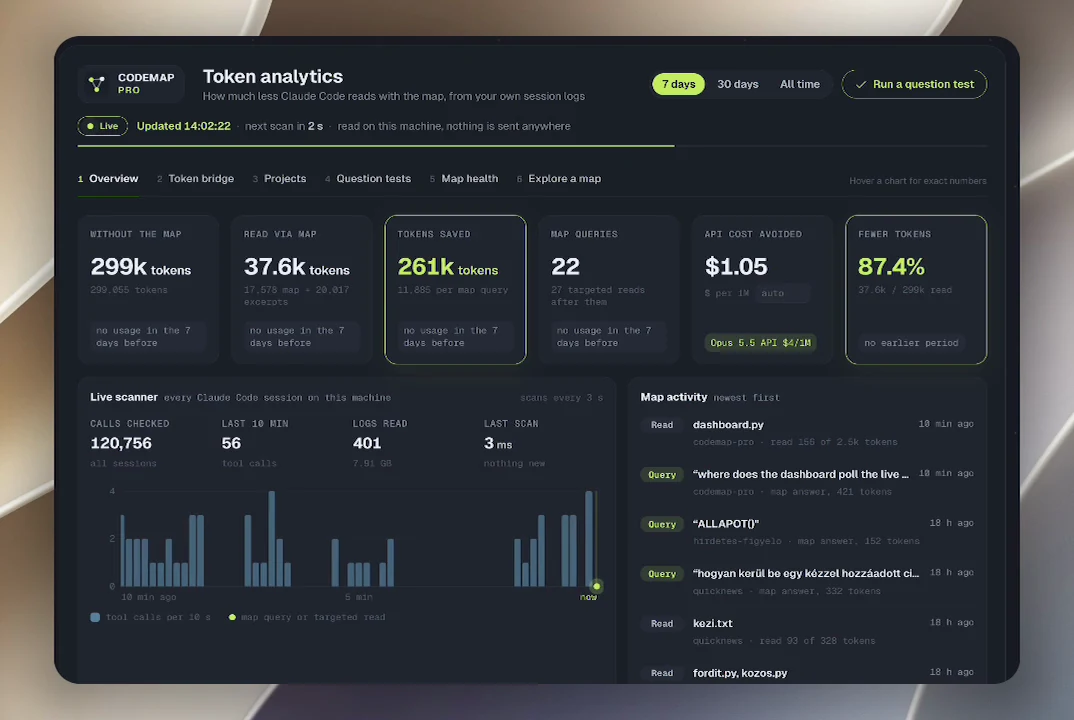
Kint van a CodeMap Pro, egy magyar fejlesztésű kiegészítő a Claude Code-hoz. Ha egy nagy projektben megkérdezed, hol történik valami, a Claude Code általában keresgél, megnyit öt teljes fájlt, és több ezer olyan sort olvas végig, amelyre nincs is szüksége. A CodeMap Pro ehelyett térképet ad neki: gráfot épít a projekt függvényeiből, osztályaiból, importjaiból, hívásaiból, dokumentációjából és mappaszerkezetéből, és a Claude előbb ebben keres.
A fejlesztő saját Claude Code-os munkájában 87,4 százalékkal csökkent a fájlolvasás: 299 055 token helyett 37 578 tokenből jött ki ugyanaz. Az eredmény projektenként eltér, ezért a csomagban van egy helyben futó, élő tokenkimutatás, amely 3 másodpercenként olvassa a Claude Code naplóit, és napra, projektre bontva mutatja a megtakarítást, a modell listaárán számolt elkerült API-költséggel együtt.
A csomagban van még egy automatikus frissítés is: amikor egy projektben munkamenet indul, a térkép néhány másodperc alatt frissül a háttérben. Egy paranccsal telepíthető macOS-re és Linuxra, és több projektből álló mappát is fel tud térképezni egyszerre. Nem hív nyelvi modellt, nem kell hozzá API-kulcs, és a kód nem hagyja el a gépet. Az ára egyszeri 14 dollár az Agensi piactéren.
Az eredeti szöveg (Agensi)
Works with the AI Agents you already use
A code map for Claude Code. Claude queries a graph of your project first, then reads only the lines it needs instead of whole files. Auto-refresh hook and a live, local token analytics dashboard included.
Converts to your local currency at checkout
Example session with this skill installed
Where does this project measure the token savings from the Claude Code logs?
The savings are measured in live_measure() in scripts/measure.py. I found it with one map query and read only the lines around it, instead of opening the whole files.
live_measure() walks every *.jsonl session log in ~/.claude/projects. A map query counts when graphify actually answered. For the next 12 tool calls it looks for partial reads of files in the project the map answered about: Read with offset or limit, or sed -n, head, tail and grep with context in the shell. A read that printed the whole file anyway is not counted. It compares the tokens actually read with the size of the whole file. Results are kept in total, per day and per project, and every tool call counts once by its id. Each log is read line by line, a log that did not change since the last run is not read again, and a log that keeps growing is followed from where the last read ended.
Measured with the built-in question test on this repository: a keyword search reading the 5 best matching files in full would have cost
26,681 tokens. The map query plus targeted excerpts cost
Connects securely to your tools. The creator never sees your data.
Claude Code spends most of its context reading files. Ask where something happens in a big project and it greps, opens five whole files, and reads thousands of lines it never needed.
CodeMap Pro gives Claude a map instead. It builds a graph of your project (functions, classes, imports, calls, docs, media and the folder tree) with graphify, and teaches Claude to query the map first and then open only the few lines it points to.
In our own Claude Code work it cut file reading by 87.4%: 299,055 tokens of whole files became 37,578 tokens of map queries and targeted excerpts. Your number will differ by project, and the built-in dashboard measures it on your own sessions.
No LLM calls, no API keys, no cost per run, no file-count limit. Your code never leaves your machine, and nothing is written into your project folders. The only download is graphify itself (uv tool install graphifyy), and only if it is missing.
Does not index the internal content of images, videos, or PDFs. Project maps are stored in ~/.codemap/ or workspace subfolders, not the project root.
Copy the prompt and paste it into Claude, ChatGPT, Cursor or any agent that supports MCP. It sets up the connection for you. Manual setup
Your agent shows a sign-in link. Sign in and click Allow.
Your agent loads this skill and uses it on your task. It always asks before any payment.
Be one of the first to try it. Every listed skill goes through the trust checks below.
Checked by our 8-point scan before listing
Doesn't do what its page promises? You get your money back.
graphify is the PyPI package graphifyy; the installer adds it if missing.
Terminal: runs the map builder and graphify queries. Read files: reads the project to build the map and Claude Code's session logs in ~/.claude/projects for the savings dashboard. Write files: maps go to ~/.codemap or <workspace>/graphify-out, and the optional installer adds one SessionStart hook to ~/.claude/settings.json (a backup is saved). Network: only the installer, to run 'uv tool install graphifyy' when graphify is missing; the dashboard listens on 127.0.0.1 only. Environment variables: optional CODEMAP_WORKSPACE and CODEMAP_HOME settings.
Kérdezz a hírektől!Az elmúlt napok quicknews-híreiből válaszolok, forrással.
A kérdésedre a mesterséges intelligencia a quicknews.hu hírei alapján válaszol, és tévedhet. A kérdést a Google Gemini dolgozza fel. Ne írj bele személyes adatot. Részletek
Az oldal magától nem használ sütit. A hozzájárulásoddal a látogatottságot a Google Analytics, a Facebook-hirdetéseink eredményét a Meta pixel méri. Részletek